
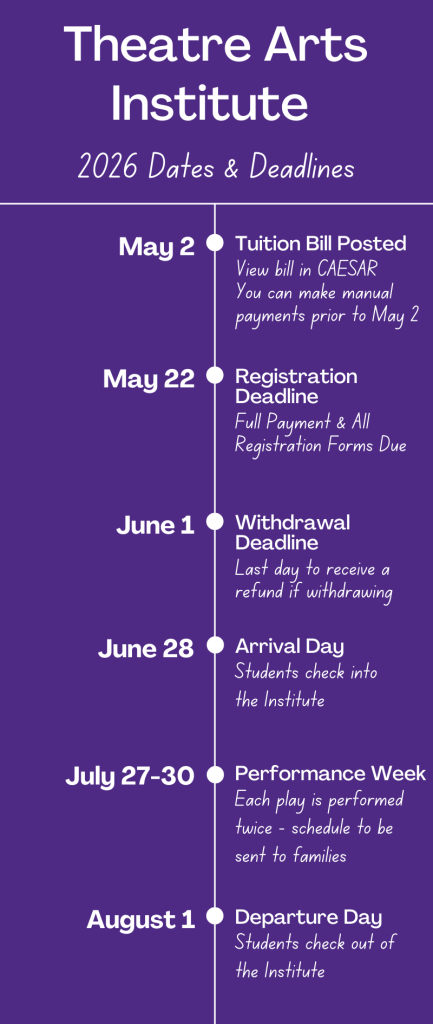
You are attending the 2026 Theatre Arts Institute, and we are so thrilled! Please bookmark this page as a helpful resource as you prepare for the summer.
All of the to-do items on this page must come after accepting your spot in the program. If you are viewing this page before you and your parent/guardian have signed your formal acceptance letter via DocuSign, please look for the link sent to your email to sign your letter ASAP and email us if you don’t see it.
Students seeking financial aid can wait to work on the below items until after you have received a financial aid update and accepted any aid awarded. Accepting your aid is your formal commitment to attend.
To Do List: See details further down
- Student Account Activation (ASAP)
- Submit Deposit (ASAP)
- Read the Student Handbook
- Email a photo/headshot (by May 22)
- Complete Registration Forms (by May 22)
- Submit Final Payment (by May 22)
- Submit Track-Specific Scheduling Forms
- Read Summer Plays
- International Students: Obtain US Cell Service & B2 Visa
2-3 weeks after you’ve accepted your spot in the Institute, we will send your NetID and a validation code, as soon as we receive them from the IT department. Your validation code expires one week after we send it to you.
- Keep an eye out for those emails, and plan to activate your student account as soon as you receive your NetID and Validation Code.
- Be sure to check spam/junk/promotions folders.
- The NetID and Validation Code emails are sent to both the student and the parent. We encourage you to set it up together if possible, due to Northwestern’s security standards.
- Your NetID will be your username, and the validation code will be your password for the first login. You will then be prompted to create a new password and set up security questions.
- If your code is not working, check in with your student/parent to see if they have already validated and set a new password. Otherwise, you may need to clear your browser’s cache before validating.
- Once your account is activated, you’ll need to set up Multi-Factor Authentication (MFA). Please do this immediately after activating your account. Northwestern uses an MFA app called Duo Mobile. Please download this app as it is the only approved multi-factor authentication that Northwestern allows. Here are instructions for setting it up.
- You must complete the MFA process once started; if you exit before registering a device, the student will need to call IT to gain access the next time you try to log in (or email if you are an international student). They can be reached at (847) 491-4357 or consultant@northwestern.edu.
- Once you’ve registered the first device (parent’s) for MFA, you can register another (student’s).
- If you have activated your account but you’re not sure what your password is, you can test it or reset it here.
Unless you are applying for Financial Aid, your are required to submit a non-refundable, $1,000 deposit to secure your spot as soon as you have activated your student account.
- The deposit is applied to your summer tuition bill
- Log into CAESAR, Northwestern’s platform for student billing. You will log in using your NetID and the password you set after activating your student account.
- Students can setup a guest account for their parents to pay their bill, but many parents simply log in as the student.
- Northwestern does not set up deposits for our summer programs, meaning you will make this payment on your student account before you are enrolled and, therefore, before you will see a bill on your account.
- Instructions for submitting payment- You will need to manually enter the amount of $1,000 while following the below instructions:
- If you are applying for financial aid, you may be required to submit a discounted deposit. Details will be included in your financial aid award notification letter in FACTS, but the instructions for doing so are the same as described above.
- Your remaining tuition will be due May 22, and your bill will be posted on May 2 with your deposit (and any other payments made) applied.
Your Student Handbook is your guide to the summer. This is also referred to as your “Info Packet.” Everything from arrival information, to packing lists, to important policies are included. Familiarize yourself with its content, and you should have a very good idea of what to expect this summer.
These forms are required to consider your registration fully complete. We must receive these forms by May 22, 2026. Any major delay may jeopardize your spot, so please communicate any questions or concerns you have with us early and often.
- Health Record Form
- Please click the link above to fill out and submit your Health Record Information, Vaccine History, Allergies, Dietary Restrictions, Medication List, etc. You should allow approximately 30 minutes to complete this form. The privacy of our students is our utmost priority. This information is shared only with the NHSI Director, Division Director, and Dorm Director who directly cares for your student, as this form provides crucial information that allows us to understand your student’s health history.
- Signed Agreement Forms (Sent via DocuSign)
- Both the student and the primary parent will receive unique links via DocuSign to sign these 7 forms. You must both access the forms via those unique links in your email, just like you did for the acceptance letter.
- Standard Operating Procedures and Rules
- NU Medicine Consent for Minors
- Permission to Treat & Transport Minors
- Photo & Likeness Approval
- Communicable Disease Parent Waiver
- Communicable Disease Student Agreement
- Community Guidelines
- Both the student and the primary parent will receive unique links via DocuSign to sign these 7 forms. You must both access the forms via those unique links in your email, just like you did for the acceptance letter.
- Roommate Form
- The roommate survey helps us facilitate your room placement. Our goal is to assign you a room with someone you will be compatible with.
- If you have any questions or concerns about room assignments, please be sure to note this on the form, or you can send us an email.
- Students can request to room with someone they know; HOWEVER, both students must request each other on this form, and that request is not guaranteed to be granted.
- Summer Program Dietary Needs Form (Only if you have dietary restrictions related to allergies or religious practices. Vegans/Vegetarians and those who avoid red meat do NOT need to submit this form.)
- This link takes you to a form that goes to the campus dietician within Residential Services.
- Please submit this form if you have any dietary restrictions due to allergies or religious affiliations that are not already accommodated as outlined in the info packet – do not complete this form for vegetarian/vegan dietary restrictions or avoiding red meat as those are already accommodated at every meal.
- The NHSI Office does not receive your responses to this form, so please be sure to include any dietary restrictions in your Health Record Form as well.
We require a headshot or photograph of yourself. The faculty will use this to learn your name ahead of the program. This is also due May 22.
- If you do not have a professional headshot, it is not necessary to have one taken for this. A high-quality selfie is fine
- “High quality” is defined as a clear photo of your face in good lighting. I.E – make sure it is not fuzzy or pixilated
- Please submit this to us at nhsi@northwestern.edu, and be sure to include your preferred first name, last name, and pronouns in the body of the email. This is what the faculty will use to learn who you are before your arrival!
- We can accept JPEG, PNG, Word, or PDF files
- Please do not send .HEIC files – this is most relevant for iPhone users
Prior to your arrival, you will need to read the below plays. You can read them at the links provided. If you choose to purchase copies of each play, we ask that you purchase the same editions/translation, so that your page numbers will be the same as the copies provided.
You do not need to understand these plays, we just want you to read them and think about them. All three will be heavily referenced in your classes, and you should print copies to bring with you. These are also all plays that any college theatre program will expect you to be familiar with.
By May 29, students receive a Crew Preference form. This is due by Noon CST on June 5.
Performance students will also receive the Elective Catalog & Preference form, so that you can review what courses will be offered to you this summer and submit your preferences.
SMDT students do not take electives, so you will not receive the Elective Preference Catalog or form. You will receive a SMDT Questionnaire instead which will help the faculty tailor curriculum to your cohort.
Musical Theatre students will receive a form to submit a video of themselves singing – more information below.
- The preference forms require a timely response, so note the deadlines that are sent with those forms. The forms remain open after the deadline, but it’s not guaranteed that your preferences will be considered if received after the deadline.
- All students will work on two crews, regardless of their concentration.
- Theatre Arts leadership aims to place you in at least one of your top choices for crew and elective classes, however, you are not guaranteed to get into your number 1 choice.
(Not applicable for students in the Performance and SMDT tracks)
Musical Theatre Song Video Link: For diagnostic purposes, Musical Theatre students must submit a link to a video of them singing, following the below guidelines.
- The Submission:
- Please make a PDF or Word document that includes a link to your video (e.g. YouTube, Vimeo, Google Drive, etc.). Be sure to include any passwords in the document if required to view.
- Make sure to list your name and song in the document.
- If you upload your video to YouTube, please change your privacy setting to “unlisted” as we cannot view “private” links.
- If you upload your video to Google Drive or Dropbox, please update your share settings so anyone with the link can view.
- Do not submit a video file or MP4 file. DO NOT SUBMIT A VIDEO FILE OR MP4 FILE. We must receive a PDF or Word file with a link to your video that anyone with the link can access.
- The Recording:
- The recording should start with an introduction of your name, the name of the song, and the musical that it comes from. (“My name is NAME, and I’ll be singing SONG TITLE from SHOW“).
- Your song selection must come from a published musical and must be performed for the video with accompaniment, either live or a karaoke track. Please do not use an excerpt from a performance.
- Limit the song to 2 minutes, preferably 32 bars (a verse and a chorus). This is our opportunity to get to know you, so sing something you love to sing.
- Select a song that demonstrates vocal quality, phrasing, rhythmic skills, and lyric interpretation.
- Select a song that expresses a character’s feelings more than one that tells a story (avoid narrative songs).
- No pop songs. No a cappella.
- If you are having a tough time finding material, look at classic American musical theatre repertoire (Rodgers & Hammerstein, Jerome Kern, Lerner & Lowe, etc.).
The ability to communicate with our international students and families is paramount to your success and wellbeing in the institute. Please ensure you and your family are prepared with the below items.
- Contact Information
- Student Cell Phone
- Students must have a cell phone with service in the US while on campus. You will be asked to confirm this phone number when you arrive to check into the program.
- WE CANNOT CALL AN INTERNATIONAL NUMBER, even if it has service in the US. If you do not have a US Cell phone number, here are your options: 1) You can purchase a cell phone and a temporary service plan in downtown Evanston at any of the mobile stores or CVS or 2) You can download the app WhatsApp, and provide us with that phone number.
- Parent/Guardian Contact
- We must be able to reach a parent/guardian in case of emergency.
- If you as the parent/guardian do not have a US cell phone number, please download WhatsApp and provide us with that contact information on the Health Record form or via email.
- Emergency Contact
- If, while attending the NHSI, a student is experiencing a medical, psychological, or other health-related concern that exceeds the NHSI’s ability to ensure their safety – or the safety of other NHSI students or staff – the student’s parents/guardians will be notified and will need to arrange for an adult to check the student out of the program within 24 hours.
- You must provide us with a contact in the United States who speaks English that can be reached in case of an emergency of this nature. Please provide this contact information on the Permission to Treat & Transport form and on the Health Record form.
- Student Cell Phone
- Health Insurance
- All international students are automatically enrolled in Northwestern’s Visiting Scholar Plan, the cost of which is $7.93 per day. Once enrolled, you will be billed for this plan through your student CAESAR account. Coverage is applied June 28-August 1.
- The Visiting Scholar Plan ensures that students have health insurance coverage that will be accepted at all local clinics and hospitals should your student require any medical care while they are on campus.
- Students must also carry a credit card or debit card to cover incidental medical costs (such as co-payments required at medical visits).
- B-2 Tourism Visa
- All NHSI programs are taken as non-credit. International students only need a B-2 Toursim Visa, which covers “Enrollment in a short recreational course of study, not for credit toward a degree.”
- Neither a Student Visa nor an I-20 are necessary.